
THE GAME ROOM
By Tom Repstad
In this new column we hope to accomplish a forum where readers can get reviews of games as well as information regarding the theory of games, hints, and tricks on how to write creative and interesting game programs. If you have any particular questions or problems about computer games, drop us a line, and we'll try to answer them through this column. In this issue I would like to address the problem of initializing computer games in particular a method I have found that allows the computer to randomly distribute objects (ships, armies, treasures, etc... ) around a playfield It is assumed at this point that parts of the playfield are restricted (ie. not allowed for play for some reason).
For example let's say we are going to a naval battle game. One of the first things to do would be designing the playfield I have laid out mine to took something like this:
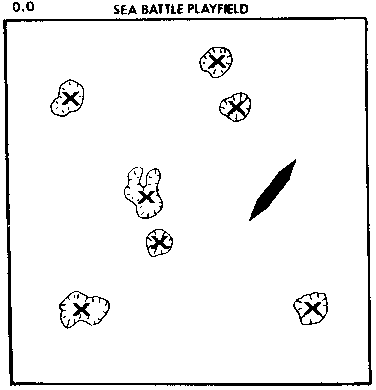
The area's with an 'X' inside are islands, and are not allowed for play, Let us assume that we don't always want the same number of islands or to place them in a fixed position each time. The reason being twofold:
1) Maintaining a constant playfield can lead to the development of 'quick win' strategies on the part of the human player.
2) It can get quite boring when the player knows ahead of time \A hat he can expect from the computer game.
The problem basically becomes how do we vary the playfield and place the computer's ship around the playfield randomly each time the game is played? There are further complications that are not readily apparent at this point, namely:
1) How do we randomly distribute n number of islands
2) How do we prevent overlapping of islands
3) How do we tell the computer where these islands are
4) And how are we going to randomly distribute our ships about the playfield without putting any in the islands.
This would appear to be a formidable programming task, however, we can accomplish the entire procedure as well as having established a data base that we can easily access later in the program in less than 50 lines of code. Difficult you say? Not if you have 'SETEMUP' & 'ISITIN', two nifty subroutines that will do the bulk of all the work for us. We will take a look at them shortly I but first lets take a took at problem # 1. A simple random number generator function can give us any number of random X,Y coordinates for n number of islands. What we would do prior to generating the random X, Y coordinates is to create a table of corner points that define our islands with a maximum of maybe 15 corner points per island. These cornerpoints would be expressed in the table as relative positions from the center of the island, we would in turn then add the random X,Y coordinates we just generated to the individual cornerpoints as a displacement value. We can also randomly select which of the island shapes we want from the island table.
Thus we would be effectively placing an island in the playfield that has a centerpoint of the random X,Y we just generated. As for problem #2, if we limit the size of the islands to fit within some relative radius, we can then use a simple distance check between the two X,Y coordinates that define the centerpoints of our islands. Note that each new island must be checked against all preceding islands.
This takes care of problems I and 2 , but 3 and 4 are a different matter. We cannot use the radius approach to place the ships around the playfield, remember we are defining the islands by a set of cornerpoints, the radius approach would cause much space that is valid to appear as being invalid to the computer. (To check this out draw an island, then draw a circle around the center of the island, making sure that no part of the circle touches the island!)
What is needed in this case is a simple approach with which we can determine if the point in question (ie. the ship), falls on one of our islands. We will probably also have the need to check this condition at later points in the program, not just in the initialization period. We could easily look at the board (screen) and determine if we had any ships on land (assuming we don't cheat!) and move them off. The computer however doesn't have any eyes (at least mine doesn't), so we have to develop some other method it can use to determine the same information. Which brings us to 'SETEMUP' and 'ISITIN'.
What SETEMUP does is to create some number of line equations describing the area(s) in question. This subroutine works for any regular or irregular shape. It works for any number of shapes, and set's Lip all for all those shapes simultaneously. As well as preparing all this information for the subsequent subroutine ISITIN. (Note: the subroutines are only limited by array sizes).
SETEMUP fills up five arrays with line equations representing the shapes I have defined, where does that leave us? It leaves us with ISITIN, which is a simple algorithm to determine if a point lies within the area's defined by the line equations from SETEMUP. If the given point lies on a line defining the area it is considered outside the area.
The pseudococle for the logic of placing the ships about would look something like this:
Step 1: Call SETEMUP for the islands def ined earlier.
Step 2: Generate random X,Y coordinate, in the range 0,0 to 319,159 (Gr. 8).
Call ISITIN for the point just generated if it's 'in' go back to Step 2.
store the ship location.
if we have more ships to place go to Step 2. END
We can allow the player to determine the position of his own vessels or we can randomly distribute his vessel's as well. If we are going to randomly distribute his ships as well then we repeat steps I & 2, but for his ships. If we are letting him deploy his ships himself then we still repeat steps I & 2, but we remove the random point generator and substitute an 'INPUT X,Y' statement in it's place.
Now that we have an idea of what we are trying to do let's take a look at the programs themselves. First we define the variables into three classes: 1) INPUT - data that must be present when the subroutine is called. 2) OUTPUT - data generated by the subroutine. 3) INTERNAL - data that has no significance outside the subroutine.
For SETEMUP:
INPUT:
A = Array containing X values
B = Array containing Y values
C = Array containing number of cornerpoints for each shape
D1 = Number of areas (islands in our case)
OUTPUT:
T = Array containing upper X boundaries
U = Array containing lower X boundaries
D, E, F = Array's that contain the line equation values
N1 = Number of line equations generated
The remaining variables used in SETEMUP are internal.
For ISITIN:
INPUT:
X =Input X coordinate
Y = Input Y coordinate
OUTPUT:
Z1 = Logical variables,
if Z1 = TRUE (Z1 = 1) otherwise Z1 = False (Z1 = 0)
The remaining variables in ISITIN are internal. Here is a quick example of how we would stuff data into SETEMUP, and subsequently call ISITIN to check a point. Let's assume we are only defining one area, it will have four corner points 1,1;4,1;4,6; and 2,5. We would set the following values in our program before we called SETEMUP:
5 D1 = 110 A(1) = 1; A(2) = 4; A(3) = 4; A(4) = 2
20 B(1) = 1; B (2) = 1; B (3) = 6; B (4) = 5
30 C(1) = 4
40 GOSUB nnn5 (CALLING SETEMUP)
50 X = 2
60 Y = 3
70 GOSUB nn205 (CALLING ISITIN)
80 Here we would test value of Z1
It is important that we only need call SETEMUP once in the beginning of the program to Set LIP the line equations, unless your particular application allows the area's being defined to move during the game, in which case you would call SETEMUP prior to each call of ISITIN. As you can see by the example application above setting the data up for SETEMUP is very simple, and calling ISITIN is even more simple.
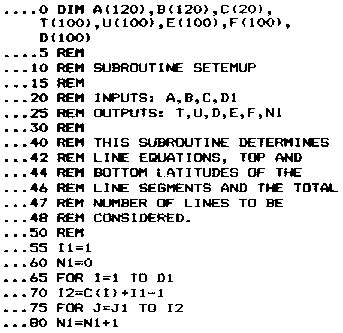
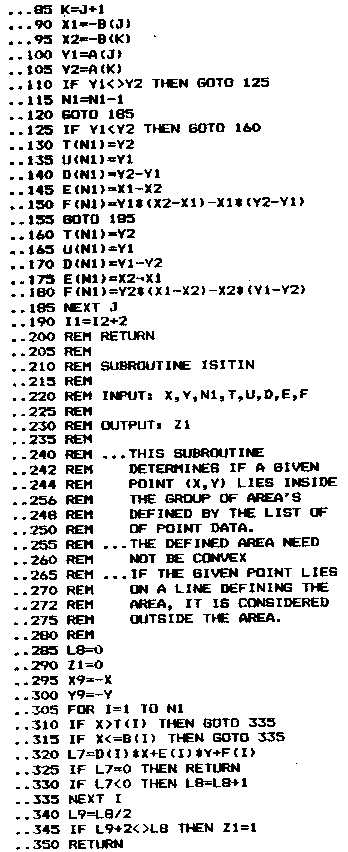
Using this method rather than 'LOCATE' to check for overlapping is much simpler. The ISITIN subroutine can be easily accessed and you don't have to use a color locate command to check every pixel (plotted point) to see if something is there. Now that I've given you some ammunition, you can put it to work. I'd be very interested to see the kind of applications you can mold this to, or any improvements you may suggest.
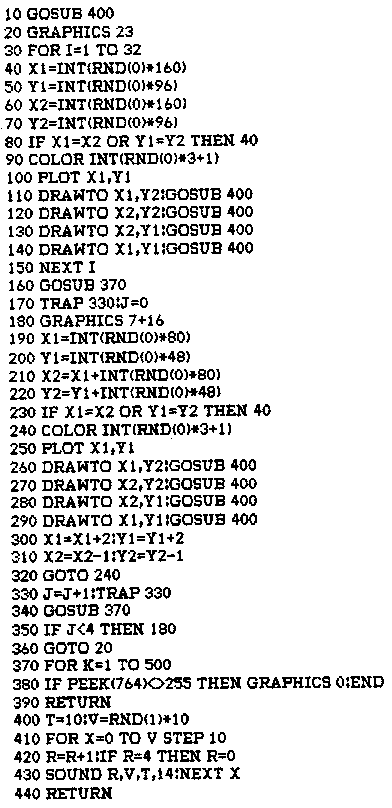
"BOXES & SQUARES" DEMO
Note: hit any key to stop
Digitized by CyberRoach Publishing for CyberRoach’s Digital A.N.A.L.O.G. Archive; restored here with permission.