
Five Star Treks / 810 and DOS II
By Lee Pappas
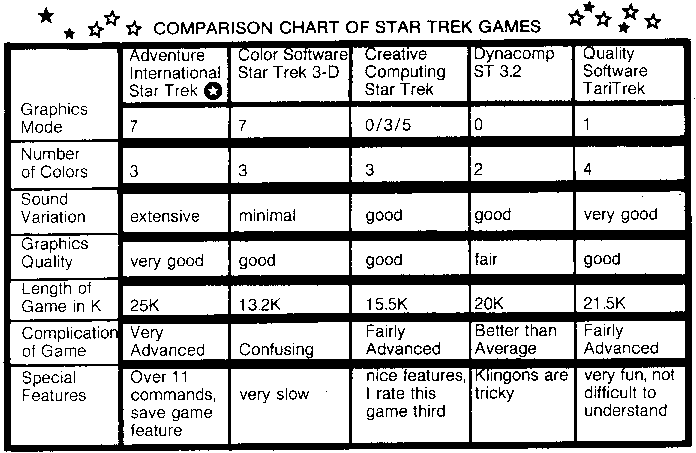
Basically the object of the game is to rid the galaxy of the dirty Klingons. In the Adventure International version you must explore all class M planets, and destroy the Klingons only when you are in danger of them attacking you. The Dynacomp Star Trek has the Klingons move if you don't act, and they also hide behind planets making you think it is a standard cruiser, when in actuality it is a powerful battlecruiser. The best graphics/sound combination comes from Adventure International by far. Actually their game borders on a mini-adventure in that the game could take a while to complete. It even has a save-game feature allowing you to save the game up to the point you are at, and later reload it progressing from that point rather than starting from the beginning. The detail in this game is really fascinating - it's almost a Star Raiders without the action; the graphics are that nice.
Quality Software's Star Trek comes in second. Their version is 'clean' looking and takes less time to complete than the Adventure International Trek
They just improved it by adding a Galactic Map, which the original did not contain. If you don't have the time to play a long game, this is the one to use. The graphics are minimal, however the sound effects are quite nice. Dynacomp's Trek can be tricky to play. It is certainly more difficult to win than are the others, strategy is important as well as being familiar with the game.
Creative Computing's advanced Star Trek is a very expanded version of the original computer Star Trek. All the standard options and rules apply. The 'I couldn't believe it' award goes to Color Software for the slowest computer game I have ever seen. This "3 D Trek" is great if you have trouble falling asleep. Or maybe you can make a move in the morning before you leave, and when you return the computer will have made its' move (an exaggeration, but it is VERY slow). Plus the instructions for the game are rather vague as to what's going on. Too bad, the game looks as though it could have been nice. Oh well.
Getting just one of these games isn't enough. I prefer the first two, however the Creative Computing version and Dynacomp 3.2 Trek contain features the others don't. The other one - forget it!
|
|
STAR TREK 3.5 | 3-D STAR TREK | ||
| Dynacomp, Inc. | Adventure International | Color Software | ||
| 6 Rippingale Rd. | Box 3435 | 5410 W. 20th St. | ||
| Pittsford, NY 14534 | Longwood, FL 32750 | Indianapolis, IN 46224 | ||
| Cassette $9.95 24K - Disk 113.95 32K | Cassette $14.95 | Cassette $15.00 24K | ||
| *CREATIVE COMPUTING STAR TREK | TARI TREK |  |
||
| From: Basic Computer Games (No. 6C) | Quality Software | |||
| Creative Computing 6660 | Reseda Blvd., Suite 105 | |||
| P.O. Box 789-M | Reseda, CA 91335 | |||
| Morristown, NJ 07960 | Cassette $11.95 24K - Disk $14.95 32K | |||
| *(must be converted for Atari) - $7.50 Book |
The ATARI 8 10 Disk Drive is now supported by
the release of the Disk Operating System Reference
Manual made available last fall. New drives should
be coming through with this manual. A new version
of DOS; DOS II, Version 2S, will be available soon
for the 810. This new version has a number of
differences over the original DOS. DOS II takes up
less memory, as it doesn't reside in RAM along side
your BASIC or ASSEMBLY language program.
When you type in the DOS command, your
program in RAM is swapped to a file on diskette -
the "MEM.SAV" file. Then DOS is put in RAM for
your use. Type "B" and DOS is erased from RAM,
and your program is put back in RAM. This allows
you to use more RAM for programming rather than
have DOS use up 9 or 10 K.
DOS 11 does away with the 'N. DEFINE DEVICE'
function. 'N' will now create a new "MEM.SAV"
file on diskette. You also won't have to return to the
MENU on DOS after you execute a command, you
can just type in a new command, or hit 'RETURN'
for the MENU listing. The four files comprising
DOS 11 are: DOS.SYS, DUP.SYS, MEM.SAV, &
AUTORUN.SYS. Also, some formatting on DOS 11
is not interchangable with DOS 1. You can run into
difficulty renaming a DOS I formatted diskette on
DOS 11 (the file name storage differs slightly). DOS
11 supports the point/random access functions on
disk now.
You may notice how reliable your disk drive is in
the way it never loses data transferring from diskette
to RAM or visa versa. When data is taken to or from
diskette, a 'counter' checks to see that the number of
bits transferred matches what was originally in the
file or program.
*Note that when the final version of DOS 11 is
released, some of what has been described may
change.
Digitized by CyberRoach Publishing for CyberRoach’s Digital A.N.A.L.O.G. Archive; restored here with permission.