
LISTEN
MUSIC COMPOSER COLUMN
Mike Des Chenes
As long as readers show an interest in this column, it will be a regular feature and will contain listings (notes) for various scores and arrangements of popular music. However; this being the first issue; I felt that it would be wise to use the following pages to explain some of the basics of reading music. Personally, I didn't know a thing about musical composition until ATARI released the Music Composer cartridge.
Since owning an ATARI, my wife noticed that our expenses were slightly higher than normal. Not because of my obsession for software or my excessive use of electricity, but because of the increased number of long distance phone calls. Our phone bill began to resemble a 48K program listing. I became one of the many ATARI owners who found themselves getting a little impatient for new' software. Don't get me wrong! I was completely satisfied with spending many late nights battling Zylons. It was just that everyone I knew had seen Star Raiders and I wanted something new to show off. So I started a phone directory that listed every ATARI dealer within a 75 mile radius, and would call at least one dealer every day. One afternoon, without warning, a voice on the other end said "We just received a shipment of Music Composer cartridges." I had to have it that day even if it meant driving 50 miles and charging it to Master Charge. I didn't even care what Music Composer did. I had to have it!!!
I finally made it home alive (I found it very difficult driving and reading the manual at the same time.) I plugged it in and flipped the power switch ... WOW! Edit, Arrange, Save, Retrieve, DOS, Listen, what's this? ... Copyright 1979? What took so long? After an hour of going through the sub menus, I decided that if I expected to hear some music, I'd have to spend a little more time with the manual (Ugh.) Another hour and forty-five minutes later, I felt as though "Row, Row, Row Your Boat" would never take the place of Star Raiders. I even tried composing a few simple tunes, with little success. Maybe I could bring it back to the store where it was purchased and explain to the sales person that my wife had already bought one for me. I decided to sleep on it and give my musical sister a call the next morning. Perhaps someone with a background in music could figure it out for me.
She stopped over the following day, and with a little embarrassment I showed off the Row Row composition and explained how the program worked. She wanted to try her luck at it and asked for a request. I just happened to have the sheet music for Star Wars. She thought that perhaps the Star Wars theme was a bit too complicated for her first attempt, but she'd give it a try. She told me that it would take her quite a while to finish the whole arrangement, so I decided to do a few chores around the house. Well, about two hours later, she called back into the room and said "LISTEN". It was fantastic! I couldn't believe my ears. How did she do that?
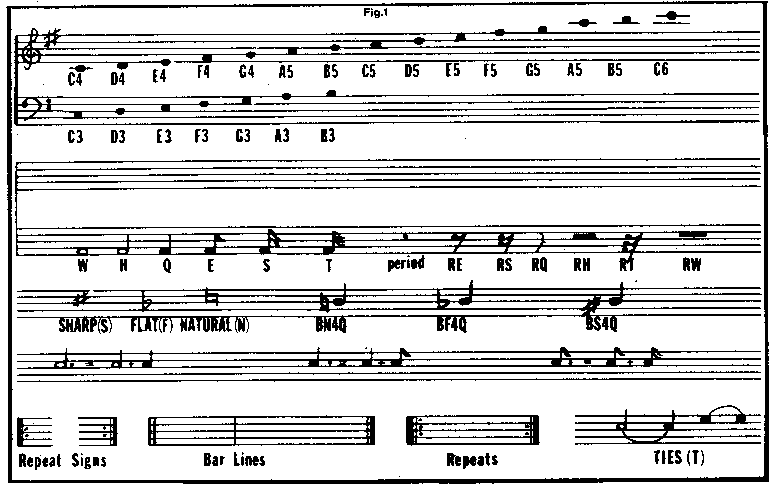
It took a few days of practice and a lot of trial and error, but with a chart she drew and a few lessons on reading music, I felt as though I wasn't such a musical dummy after all.
The chart (figure 1 ) shows examples of note placements with their appropriate letter name: C, D, E, F, G, A, B, or R (rest), and octave (3 through 6). However, you must also include the note duration, (Whole, Half, Quarter, Eighth, Sixteenth, or Thirtysecond note.) Also included is a listing of rests with their computer accepted abbreviations. The duration of a rest is equal to the duration of the note it replaces, Le. an Eighth note and an Eighth Rest have the same duration. Accidentals (Sharps, Flats, or Naturals) are also important when composing or copying sheet music and may be part of the key signature at the beginning of every line of music, or written in front of the notes which are to be changed. The Sharp sign (#) raises a note, the Flat sign ( ~ ) lowers a note, and the Natural sign ( ~ ) contradicts (cancels) the effect of an Accidental Sharp or Flat in the same line preceding the Natural or in the Key Signature.
Musical sounds, or NOTES, are named after the first seven letters of the alphabet (A-B-C-D-E-F-G) after G, the note name starts again at A. After every eight notes there is another note with the same name. These notes are given the same names because they sound very similiar, in spite of being higher or lower than each other. All notes are not used for every instrument or voice. So to make it easier to read and understand, music is divided into two parts, one for higher voices and instruments, and the other for lower.
Signs called CLEFS tell us whether the music is for high or low voices and instruments. Normally two Clefs are used and one is shown at the beginning of every line of music. The Treble or G Clef is for the higher voices and instruments. The Bass or F Clef is for the lower. Most sheet music for piano, organ and other keyboard instruments use both Clefs together because they have such a wide range of notes. This type of sheet music is the type that you should look
for when you are considering using your ATARI to play the notes.
All notes are written on sets of lines and spaces called A Staff. There is one Staff for the Treble or G Clef and another for the Bass or F Clef. Each line and space on the Staff is like the rung on a ladder, one note on a line, and the next note higher in the space above, and so on. The higher the note is on the Staff, the higher it sounds. The Clefs help by giving us the position of one note. If you look at the G Clef you will notice that it draws a ring around the second line, which shows the position for the note G. Using the G note as a reference, it is easy to determine the positions of the other notes on the G Clef, remembering that the other notes run in order up the Staff. G is on the line, A is in the space above, B is on the next line and so on. The Bass or F Clef also gives us the position of a note, the F. This time the F note is always located on the fourth line. You will notice that the big dot on the F Clef symbol marks this position.
Notes have many different shapes. Each shape lasts for a certain number of beats which can be counted. A WHOLE NOTE lasts for four beats, which you would count 1-2-3-4, in time with the music. A HALF NOTE lasts for two beats (half as long as a Whole Note) and so on. To make counting easier, music is divided with vertical lines called BAR LINES. Bar Lines do not stop the beat. You should count as if they don't exist and are used to help separate the beats when counting. A DOUBLE BAR LINE marks the end of a piece of music, and can also divide music into sections or Phrases.
Most music has more notes than can be shown on the five lines and four spaces of the Staff, These notes are written in the areas above and below each Staff on short lines. These notes are worked out in exactly the same manner as the notes we have already discussed. After a while you will come to recognize these notes.
In most music, one or more of the instruments or voices are silent for a few beats. These silent beats are known as RESTS. Rests are counted in the same way as the notes they replace, i.e. a whole rest lasts as long as a whole note and has the same number of beats. Rests can be found at the beginning or end of music, or between the different Phrases of a melody.
When a note is carried on into the next bar, a curved line called a TIE is used. A Tie makes the first note longer by joining it to the note at the beginning of the next bar. Ties can also join two or more notes together in the same bar, and will make the first note last for the combined number of beats of the notes tied together. Ties will only work with notes that have the same name and position on the Staff with no different notes in between. Do not confuse a SLUR for a Tie. A Slur can be used over or under several different notes and means that those notes should be played smoothly.
I could devote this entire issue to the basics of music. However, the information we have covered so far should help most of you in getting started. If you need additional information, refer to the chart or the Music Composer manual. In future issues we will get into music a little deeper and explain what your ATARI is capable of. I will also have a few song listings that you can use. Any requests?
Digitized by CyberRoach Publishing for CyberRoach’s Digital A.N.A.L.O.G. Archive; restored here with permission.