

16K Cassette or Disk
by William Abell, Jr.
Have you ever spent hours typing in one of the very good programs provided in ANALOG, because your typing ability was at or near zero? This program may be able to help you. It provides you with a screen full of random words to allow you to practice your typing technique. The score, printed at the bottom of the screen after each time trial, provides an incentive to improve both your speed and accuracy.
How to use the program
When the program is run, it will first display a title screen, then an introduction screen which explains how to use the program. At the bottom of the screen is the prompt to press the START button to begin. As soon as the button is pressed, the screen goes blank, while the computer makes up random length words. A few seconds later, the screen comes alive again with seven lines of text -- which could be a message in secret code or a foreign language. In reality it is neither, simply characters chosen at random by your Atari computer.
The cursor is positioned directly under the first character of the first line, ready to make its journey to the bottom right of your screen. As soon as you type the first character, the computer stopwatch is started, so that your typing speed can be calculated. The computer also keeps track of the errors that you make as you type, so that your accuracy can be calculated, too. As you type the last character of each line, the cursor is automatically positioned under the first character of the next line of text.
If you make an error, do not attempt to go back and correct it. All keys are disabled except for the letter keys and the spacebar, so any attempt at correction would be fruitless. As soon as the last character is typed, the computer looks at its stopwatch, computes your speed and displays it on the screen. The percent of characters typed correctly is also displayed.
To try again, simply press the START button and, in a few seconds, a brand new screen full of text will be displayed. To end the program, you must press the BREAK key.
Program customization
As you become proficient at typing the alphabet, you may want to expand the program to include other characters. The program is well documented, so you should have no trouble customizing it to your own desires. For example, if you wanted to practice typing numbers, you could change the second statement in Line 150 to: T=RND(0)*9+48 and Line 410 to: IF K<48 OR K>57 THEN 380. The change to Line 150 alters the ATASCII codes randomly generated to those between 48 and 57, which corresponds to all the numbers from 0 to 9. The change to Line 410 alters the values of the ATASCII codes accepted from the keyboard to numbers only, plus the spacebar which is accepted on Line 400.
Those wanting to get really ambitious might consider modification of the program, so that it randomly generates real words, rather than words made up of random characters. One way to accomplish this is to load words of different lengths into a pseudo-table, which is then accessed randomly and loaded into the string, T$.
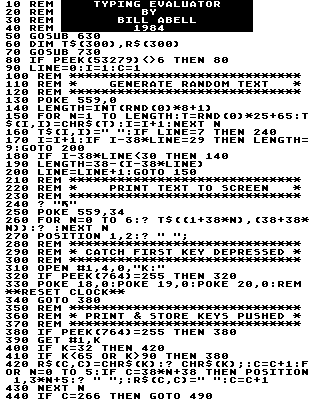
- Line 50 -- Selects subroutine to display title screen (optional).
- Line 60 -- DIMensions string variables.
- Line 70 -- Selects subroutine to display the introduction screen.
- Line 80 -- Stops program execution until START button is pushed.
- Line 90 -- Initializes variables.
- Line 130 -- Turns off DMA to allow faster character generation.
- Line 140 -- Generates a random length for next word.
- Line 150 -- For/next loop to generate random characters for the word and place them in the string, T$.
- Line 160 -- Provides trailing space for the word and checks for end of text.
- Lines 170 - 200 -- If within nine spaces of the end of the line, define length of next word to even out line and increment line number.
- Lines 240 - 270 -- Clear screen and turn on DMA. Print T$ to screen with two spaces between each line and position cursor under first character.
- Lines 310 - 340 -- Line 320 stops program execution until the first key is depressed. Line 330 resets the Atari's timer to 0 (starts the stopwatch).
- Lines 400 - 410 -- Rejects all keys except letters and spacebar (other keys may be included by changing the numeric values in these statements).
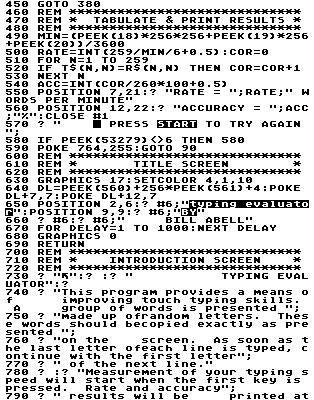
- Lines 420 - 430 -- LOADS the typed character into the string, R$, prints the character, and positions the cursor under the first character of the next line, when the end of line is reached.
- Line 440 -- routes program to calculation of results section when last character is typed.
- Line 490 -- Determines elapsed time in minutes by reading Atari's timer (stops stopwatch).
- Line 500 -- Calculates typing speed in words per minute.
- Lines 510 - 530 -- Compares random character string, T$, to typed character string, R$, to determine number of correct entries.
- Line 540 -- Calculates the percent accuracy.
- Lines 550 - 560 -- Prints results.
- Line 580 -- Stops program execution until START button is pressed.
- Lines 630 - 690 -- Title screen subroutine. Mixes graphics 1 and graphics 2 characters on screen by using display list manipulation in Line 640. Line 670 provides a time delay for viewing title screen.
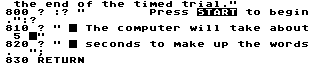
- Lines 730 - 830 -- Introduction text to explain how to use program.
Variables description
- LENGTH -- Length of random word
- T -- ATASCII code of random character
- T$ -- String containing random text
- LINE -- Sequence number of line
- I -- Sequence # of random character
- C -- Sequence # of typed character
- R$ -- String containing typed characters
- N -- Counting variable
- K -- ATASCII code of typed character
- MIN -- Elapsed time in minutes
- RATE -- Typing speed in words per minute
- COR -- Number of characters correct
- ACC -- Percent of characters correct
- DL -- Display list pointer
- DELAY -- Time delay loop counting variable
10 DATA 335,81,610,121,763,765,769,679
,267,778,773,784,780,366,172,8043
160 DATA 271,212,654,438,306,783,906,7
89,376,4,849,816,804,158,782,8148
310 DATA 265,520,496,727,797,145,803,5
50,581,439,668,753,753,277,732,8506
460 DATA 802,72,808,4,293,356,844,755,
613,964,329,524,866,145,788,8163
610 DATA 249,794,263,854,851,637,652,9
18,618,790,875,796,447,26,761,9531
760 DATA 540,911,205,788,674,328,307,6
04,4357
Digitized by Eric Petrich for CyberRoach’s Digital A.N.A.L.O.G. Archive; restored here with permission.