
BUGS & BYTES....
by Mike DesChenesAs far as price, flexibility, performance, and hardware are concerned, I consider the Atari computers to be the best on the market. And because A.N.A.L.O.G. is concerned only with the Atari computers, this column will be short lived. However, if you have any problems or questions no matter how minute they may seem to you, drop me a line and I'll try and include it along with the remedy in this column.
Occasionally a number of early Atari's have given their owners quite a scare because of a very minor problem.
SYMPTOM: You turn your system on and out of the clear BLUE sky ... nothing! (Well, almost nothing). just a dark blue screen (depending on your monitor). You bang it a little, turn it off and on a few times, and finally it surrenders with "READY". Other than a complete meltdown, I can't think of anything more frightening.
CAUSE: If you were to look inside the 400; (1 wouldn't recommend it if your warranty is still in effect or if you're not mechanically inclined); or take the door off the 800, you would notice the ROM and RAM boards. In the 400 you would see two vertically mounted PC boards, which are the RAM and CPU boards (The 800's CPU board is mounted internally in the area directly behind the third RAM board slot.) Actually the 400 and 800 both use the same type of RAM board. Contained in the 800's 8K RAM cartridge is the same board that you would find in an 8K 400 (give you any ideas?) The problem stems from the edge connectors on either or all of the boards. Oxidation because of humidity or other environmental conditions, may cause a bad connection between the boards and sockets.
CURE: When taken to one of the Control Data repair centers, they remedy this problem by simply removing the boards from their pin connectors and gently cleaning the surfaces of the board pin contacts and lightly coating them with "Lubiplate" (available at many industrial electronic part suppliers.)
If you have previously had your Atari upgraded or serviced at any one of the Control Data repair centers, then it would be safe to assume that the above specifications have already been performed. Which proves to me that Atari and Control Data are working closely together to maintain the high standards of excellence that Atari owners have come to expect.
NOTE: I have noticed that most of the newer 800's have been shipped with gold plated edge connectors on the RAM and ROM boards, and according to an Atari official, the 400's will be coming through the same way.
HAPPY BIRTHDAY
How old is your Atari? Three months? I don't mean how long have you been the proud owner, but how many days, weeks, months, have gone by since it was built? Who cares? Well, it may not be as important to you as the new Asteroids cartridge, but admit it, you must be a little curious.
The 800 which I constantly use has the serial number 490. Some of the later ones also have the first three numbers with WW preceding them (Example WW490). These first three numbers tell the year and work week that your computer was built. The first two numbers designate the work week, in this case the 49th. The third number (0) tells you the year (0 = 1980, 9 = 1979 and so on.) You can also read your serial number in the same way on the Atari disk drives. I'll bet that the next few minutes you'll be taking a peek at your serial number.
Have you ever spent hours working on a program, editing and deleting lines or words only to be rewarded by having your ATARI lock up on you? With no alternative left but to turn the power off and start over? If the answer to that question is yes, then you're not alone. Don't worry, there is nothing wrong with your system (well nothing that can be repaired anyway.) It seems that if you spend a lot of time editing any part of a program, you will find that more often than not, it will lock up. For some strange reason your ATARI can not perform too many edits at a time. One way to avoid this dilemma is to LIST or RUN the program after every couple of line edits. If you follow this simple practice you may find that your problem will be solved. This may seem like an inconvenience but if you weigh this against the possible loss of a valuable program, and the great editing capabilities of the ATARI, then it seems a small price to pay.
Have you ever wished that it was possible to ask your Atari how it was feeling? Well. below is a listing which can help give you an idea of your Atari's health.
It's actually a very simple program which utilizes the fill function. The program fills the screen with a color (1) and should fill all pixels. If there is a pixel which did not retain the color, then there is a good chance that there is a bad bit. However, a bad bit may never be noticed and it does not necessarily mean that you'll have any problems. But it's a comforting feeling knowing that everything is up to par.
10 GRAPHICS 7+1620 PLOT 159,95
30 DRAWTO 159,0
40 DRAWTO 0,0
50 POSITION 0,95
60 POKE 765,1
70 XIO 18,#6,0,0,"S:"
80 GOTO 80
STICK (Driving Controllers)
Format: STICK(aexp)
Example: PRINT STICK(O)
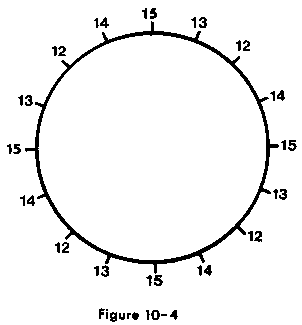
This function works the same way as the paddle and STICK commands, but in this case is being used with the Atari Driving Controllers. The
driving controllers are numbered from 0-3 from left to right.
Figure 10-4 shows the numbers that will be returned when the driving controller is turned in any direction.
NOTE: You may find it helpful if the above information is photocopied and attached to page 60 of your Basic Reference Manual.
Digitized by CyberRoach Publishing for CyberRoach’s Digital A.N.A.L.O.G. Archive; restored here with permission.