
64+
Barry L. Camp
The new commands that this utility adds to the 64 make editing and programming much more enjoyable. "64+" alters the operating system itself to create a new working environment.
"64+" is a full-scale enhancement to the 64's operating system. It works by copying the entire contents of the BASIC and Kernal ROMs into the underlying RAM and then making modifications to add new features.
64+ consists largely of new CHR$ and keyboard commands that perform useful functions. Other capabilities include a more useful USR function, preprogrammed function keys, disk drive defaults, and a numeric keypad.
Typing It In
Since 64+ is a machine language program, you will need to type it in using "MLX," the machine language entry program found elsewhere in this issue. Be sure you are familiar with MLX before you begin typing in 64 +. When MLX asks for starting and ending addresses, respond with the following:
Starting address:	0801
Ending address:	0C40
Type in the data, and be sure to save a copy before leaving MLX.
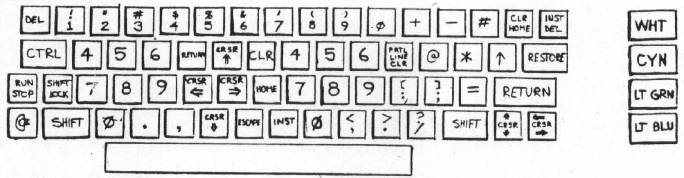
Although 64+ is written in machine language, it loads and runs just like a BASIC program. To get started, load 64+ and type RUN. You will notice some changes immediately. The lowercase character set is switched in and the screen colors change. These visual cues also appear every time you press RUN/STOP–RESTORE. This different visual appearance serves as a reminder that that you are operating under 64 +. Try out the new commands and keystrokes provided by 64 +. The accompanying quick-reference table and keyboard map are all you need to begin experimenting.
Most of the new commands can be used in three ways. First, you can use them in immediate mode by typing the proper combination of keys (especially helpful when you are editing a BASIC program). Second, you can use the CHR$ function in a PRINT statement to print the corresponding character code for the command. For example, PRINT CHR$(7) will ring a bell in 64 +. Finally, you can type the key combinations within quotes in PRINT statements. In quote mode, the commands appear as reverse letters. The quick-reference table has all the information you need to use the commands in any of the three ways mentioned.
New Characters
One of the most powerful features of 64+ is the addition of 15 new characters. These can be accessed by the CHR$ function or typed directly from the keyboard. Machine language programmers can use Kernal routines to access these new characters.
Here is a description of the characters which may not be self-explanatory. To find the corresponding keystroke and the character that appears when you use the command within a string, refer to the quick-reference table and the keyboard map.
Tab
This is a version of the comma delimeter used in PRINT statements. PRINT "Hello","there" and PRINT "Hello there" both have the same effect. Press the STOP key for this character. In immediate mode, the STOP key tabs the cursor.
Line home
This moves the cursor back to the beginning of the current logical line. For example, when editing a BASIC line, hold CTRL and press the back-arrow key to place the cursor on the first digit of the line number.
Partial screen clear
Clears everything below the current cursor position.
Partial line clear
Clears from the cursor position to the end of the current logical line. This is especially powerful for editing BASIC lines. Depending on how the cursor is positioned, it is possible either to trim unwanted or unneeded statements off the end of a line (like REM or STOP statements), or to delete the entire line by erasing all but the line number (and then press RETURN).
Delete
This is similar to the normal delete except that instead of pulling part of a line back over the unwanted characters to the left, the cursor remains stationary, and unwanted characters are pulled into the cursor from the right. Use the CTRL or Commodore key in conjunction with the INST/DEL key for this "black hole" delete.
Repeating-key control
If you want all keys to repeat, use CHR$(22). If you don't want any to repeat, use CHR$(23). The default is CHR$(24), which corresponds to the setting of a normal 64—only the cursor keys.
Set color RAM
This sets every location on the screen to the current cursor color.
Escape
This may prove to be the most useful of the new characters. It cancels insert, reverse, and quote modes. It also resets the default key-repeat values and resets the SID chip registers to their default values.
Additional function-key characters Normally there are eight function keys: f1, f3, f5, and f7 are unshifted, while f2, f4, f6, and f8 are obtained in conjunction with the the SHIFT key. 64 + adds four more function keys (f9-f12), which are entered by pressing the Commodore key in conjunction with the function keys.
Other Features
In addition to the new characters, these features are also part of 64 +:
- Freeze. Whenever the SHIFT-LOCK key is engaged, the screen stops scrolling, effectively freezing it. This is handy for examining listings or anything else that is too large to fit on one screen. To continue normal scrolling, release the key.
- Four preprogrammed function keys. By holding down CTRL and pressing one of the function keys, the corresponding one of the following four BASIC keywords is automatically printed to the screen: DATA (f1), LIST (f3), RUN (f5), SYS (f7).
- Disk drive defaults. Device 8 is now the default device for LOAD, SAVE, and VERIFY. It is no longer necessary to add, 8 to the command for disk loads and saves. (However, it is now necessary to add, 1 to the SAVE, LOAD, or VERIFY command when using tape.) Note also that SHIFT-RUN/STOP has also been altered to facilitate the new device change. That key combination will now load and run the first program on the disk.
- End-of-line warning system. When you are near the end of an 80-character logical line, 64 + notifies you with a tone. This is especially useful when entering large amounts of data while looking away from the screen.
- Audible error messages. A bell-like tone sounds whenever an error occurs in a BASIC program. This is intended for those times when you are unable to see error messages (when programming with a graphics screen, for example).
- Numeric keypads for quick data entry. The keyboard map shows a special keyboard configuration, accessible by holding down the Commodore key and pressing CTRL. Notice that a # appears under the cursor. This is to let you know that the keyboard is in numeric mode (which affects unshifted keys only). Now you have one-touch access to important control characters, 4 of the 16 available colors (for text), and the new numeric keypads. Notice that the left group of numbers is in a different order than the right. This allows you a choice between the telephone- and calculator-style keypad formats. When you are ready to exit numeric mode, just press Commodore-CTRL again. This time a \ will appear, and the keyboard will be back to normal.
A Useful USR
Machine language programmers will appreciate the new application of the rarely used USR function. It can now be used to find the values of system vectors. To use it, simply pass the address holding the low byte of the vector. For example,
NMI = USR(65530) : PRINT NMI
would return the value 65091, the starting address of the NMI routine. Calculating available memory is also a breeze, with this short formula:
MEM = USR(51) - USR(49)
This example subtracts the values of the vectors that point to the top and bottom of available memory.
Memory Conflicts
Be careful when writing programs that use POKE statements, because BASIC and the Kernal are now in RAM. Also, 64 + uses location 787 ($0313) for various flags, as well as locations 51617–52223 ($C9A1–$CBFF). Stay away from these areas of memory to avoid a crash. One commonly used utility that works with no conflicts is the DOS Wedge, which resides in memory immediately following the locations used by 64 +.
Quick Reference Table
| Description | Character Code | Keyboard Access | Appears As |
| Tab | 3 | RUN/STOP | reverse c |
| Line Home | 6 | CTRL-1 or Commodore-1 | reverse f |
| Bell (Tone) | 7 | CTRL-G | reverse g |
| Partial Screen Clear | 11 | CTRL-CLR/HOME or Commodore-CLR/HOME | reverse k |
| Partial Line Clear | 16 | CTRL-RETURN or Commodore-RETURN | reverse p |
| Delete | 21 | CTRL-INST/DEL or Commodore-INST/Del | none |
| All Repeat | 22 | CTRL- + | reverse v |
| No Repeat | 23 | CTRL- - | reverse w |
| Default Repeat | 24 | CTRL-£ | reverse x |
| Set Color RAM | 26 | CTRL-Z or Commodore-0 | reverse z |
| Escape | 27 | SHIFT- =,CTRL- =, or Commodore- = | none |
| f9 | 128 | Commodore-f1 | reverse - |
| f10 | 130 | Commodore-f3 | reverse b |
| f11 | 132 | Commodore-f5 | reverse d |
| f12 | 143 | Commodore-f7 | reverse o |
64 + will probably not work with your favorite word processor. Word processors are generally self-contained machine language programs that provide their own special editing functions and other features. For instance, SpeedScript and 64+ will not work together.
64 +
Please refer to the "MLX" article elsewhere in this issue before entering the following program.
0801 : 1F 08 00 FA 8F 20 12 20 93
0809 : 36 34 2B 20 42 59 20 42 A2
0811 : 41 52 52 59 20 4C 2E 20 E4
0819 : 43 41 4D 50 20 00 37 08 41
0821 : 40 FA 9E C2 28 34 33 29 B1
0829 : AA C2 28 34 34 29 AC 32 59
0831 : 35 36 AA 35 36 00 00 00 C3
0839 : 78 A2 FF 9A A5 01 09 03 1E
0841 : 85 01 A0 00 A9 BF 84 58 16
0849 : 85 59 84 5A 85 5B A2 20 A7
0851 : 20 EC A3 A9 FF 85 59 85 0A
0859 : 5B A2 20 20 EC A3 A2 00 01
0861 : 8E DA EC A2 06 8E 3C EC 07
0869 : 8E D9 EC E8 E8 8E DA E1 7C
0871 : 8E 2D E7 E8 E8 8E 3D EA 86
0879 : E8 8E 36 EC 8E AB EC A2 D6
0881 : 10 8E 04 EC 8E 79 EC E8 A9
0889 : E8 8E C5 FD A2 15 8E FB CC
0891 : EB 8E 03 EC 8E 78 EC E8 83
0899 : 8E A0 EC 8E D1 EC E8 8E 42
08A1 : A3 EC E8 8E A8 EC E8 E8 78
08A9 : 8E E5 EB 8E 26 EC E8 8E 26
08B1 : F7 EB 8E 38 EC 8E AD EC F7
08B9 : A2 20 8E FC E8 8E 07 EB 40
08C1 : 8E 68 FD 8E 6B FD 8E C4 11
08C9 : FD E8 E8 8E E9 EC A2 2A 8B
08D1 : 8E 77 EB 8E EA EC A2 3F FC
08D9 : 8E 86 E7 A2 4C 8E 2C E7 D6
08E1 : 8E 85 E7 8E 44 EB A2 80 18
08E9 : 8E 07 EC E8 E8 8E 08 EC AD
08F1 : E8 E8 8E 23 E5 8E 09 EC 1D
08F9 : A2 8F 8E 06 EC A2 A1 8E 35
0901 : C7 E3 A2 C1 8E FD E8 8E 2D
0909 : 69 FD A2 C6 8E 6C FD A2 D4
0911 : C9 8E C9 E3 8E CC E5 8E 25
0919 : 09 EB 8E 46 EB 8E 6A FD 4D
0921 : 8E 6D FD E8 8E 2E E7 8E AF
0929 : 87 E7 E8 8E 28 E5 8E 78 6D
0931 : EB 8E C6 FD A2 CF 8E E8 EF
0939 : EC A2 D7 8E 08 EB A2 E0 64
0941 : 8E 45 EB A2 E3 8E 87 FD F9
0949 : E8 8E FE E8 E8 8E D6 FD 0F
0951 : A2 EA 8E CB E5 8E 2F E7 AD
0959 : 8E 30 E7 8E 88 E7 8E 89 2F
0961 : E7 8E 8A E7 8E 0A EB A6 F5
0969 : 2C E8 E8 E8 18 A5 2B 69 8E
0971 : C1 85 5A 90 01 E8 86 5B 2E
0979 : A9 A1 85 58 A9 CB 85 59 DF
0981 : A2 03 A0 5F 20 EC A3 18 C3
0989 : A5 5A 69 5F 85 5A A5 5B 64
0991 : 69 03 85 5B A0 1D B1 5A B6
0999 : 99 B5 E4 88 C0 0B D0 F6 D5
09A1 : B1 5A 99 9D E4 88 10 F8 92
09A9 : A9 07 8D 6F A3 A8 88 B9 85
09B1 : 69 A3 99 68 A3 88 D0 F7 F3
09B9 : A5 01 29 FD 85 01 4C F2 9F
09C1 : FC A5 15 48 A5 14 48 20 11
09C9 : F7 B7 A0 00 B1 14 85 63 26
09D1 : C8 B1 14 85 62 68 85 14 63
09D9 : 68 85 15 A2 90 38 4C 49 95
09E1 : BC A9 03 85 C2 60 E6 C2 9D
09E9 : A5 C2 C9 A0 90 08 68 68 A0
09F1 : A9 FD 48 A9 87 48 60 F0 0B
09F9 : 06 C9 11 F0 02 C9 15 60 74
0A01 : 8D 00 DC AC 8D 02 8C 8E 5E
0A09 : 02 60 20 16 E7 AD 13 03 BA
0A11 : A4 D3 C0 4A 90 0C 29 01 31
0A19 : D0 0D EE 13 03 A9 07 4C 01
0A21 : 16 E7 29 FE 8D 13 03 60 6E
0A29 : D0 03 4C 91 E8 C9 15 D0 72
0A31 : 13 98 D0 02 E6 D6 C4 D5 21
0A39 : F0 22 A5 D8 F0 02 C6 D8 86
0A41 : C8 4C 50 E7 C9 1B F0 03 F4
0A49 : 4C 31 E7 20 12 CB A9 00 E1
0A51 : 85 C7 85 D4 85 D8 8D 91 54
0A59 : 02 8D 8A 02 4C A8 E6 C9 DF
0A61 : 03 D0 10 38 98 E9 0A B0 E1
0A69 : FC 49 FF 65 D3 85 D3 A8 A9
0A71 : 4C 96 E7 C9 06 D0 09 C0 31
0A79 : 28 90 02 C6 D6 4C A6 E7 8F
0A81 : C9 07 D0 31 78 20 1A CB AD
0A89 : A9 1E 8D 01 D4 A9 F2 8D 7C
0A91 : 06 D4 A9 21 8D 04 D4 A2 ED
0A99 : 7F 20 B3 EE CA D0 FA 20 8A
0AA1 : 9F FF A9 20 8D 04 D4 A2 85
0AA9 : 37 20 B3 EE CA D0 FA 8E E4
0AB1 : 04 D4 4C A8 E6 C9 10 F0 80
0AB9 : 2C C9 0B D0 3F A6 D6 E8 EF
0AC1 : B5 D9 30 01 E8 E0 19 10 4A
0AC9 : 0B B5 D9 09 80 95 D9 20 CA
0AD1 : FF E9 30 F0 38 A5 D3 E9 5F
0AD9 : 28 10 02 69 28 85 D3 A8 84
0AE1 : A6 D6 20 F0 E9 20 24 EA 15
0AE9 : E6 D5 AE 86 02 A9 20 20 3C
0AF1 : 1E EA C8 C4 D5 90 F6 C6 DA
0AF9 : D5 4C A8 E6 C9 16 90 0E 65
0B01 : C9 19 B0 0A AA BD D5 CA BB
0B09 : 4C 39 CA 80 40 00 C9 1A A4
0B11 : D0 17 AD 86 02 A2 FA 9D A1
0B19 : FF D7 9D F9 D8 9D F3 D9 77
0B21 : 9D ED DA CA D0 F1 4C A8 19
0B29 : E6 C9 12 D0 02 85 C7 4C 76
0B31 : 8B E7 AD 13 03 29 7F 8D 37
0B39 : 13 03 A0 17 A9 00 99 00 9F
0B41 : D4 88 10 FA A9 0F 8D 18 52
0B49 : D4 60 AD 8D 02 C9 04 D0 80
0B51 : 0E A4 CB C4 C5 F0 08 C0 20
0B59 : 03 90 04 C0 07 90 03 4C 6E
0B61 : E0 EA B9 6A CB CD 89 02 2B
0B69 : 90 03 AD 89 02 AA 98 0A CC
0B71 : A8 B9 6B CB 85 B0 B9 6C 43
0B79 : CB 85 B1 8A A8 88 B1 B0 31
0B81 : 99 77 02 88 10 F8 86 C6 43
0B89 : A2 FF 4C 26 EB 03 04 04 54
0B91 : 03 79 CB 7C CB 80 CB EC AD
0B99 : EC 53 59 53 44 41 54 41 6C
0BA1 : 4C 49 53 54 AD 8D 02 F0 78
0BA9 : 21 C9 06 D0 05 CD 8E 02 0F
0BB1 : D0 03 4C 4B EB AD 13 03 6E
0BB9 : 49 80 8D 13 03 30 03 A9 FF
0BC1 : 9C 2C A9 A3 AE 86 02 20 54
0BC9 : 1C EA 2C 13 03 30 05 A2 E4
0BD1 : 00 4C 6C EB A9 BF 85 F5 94
0BD9 : A9 CB 85 F6 4C E0 EA 14 A7
0BE1 : 0D 1D 9A 05 9F 99 11 33 22
0BE9 : 35 37 34 30 38 36 01 35 C3
0BF1 : 0D 39 36 2C 9D 91 2E 37 2D
0BF9 : 93 1D 38 1B 13 34 11 39 9E
0C01 : 35 31 30 30 32 36 94 2B C7
0C09 : 10 33 2D 2E 3A 40 2C 23 CC
0C11 : 2A 3B 13 01 3D 5E 2F 31 72
0C19 : 14 04 32 20 02 34 03 FF 6B
0C21 : 2B 20 49 4E 53 54 41 4C 9F
0C29 : 4C 45 44 21 CE A5 02 78 DC
0C31 : A9 FD 8D 00 DC AD 01 DC CB
0C39 : C9 7F F0 F9 58 60 00 00 18