
MIDIMAX:
MIDI FOR THE CLASSIC-8
REVIEW
BY ALAN SHARKIS. AC STAFF REVIEWER
MIDI On The Falcon
The release of the Atari Falcon 030 has musicians cheering. After a usergroup meeting that includes a demo of the Falcon's MIDI capabilities to my club's musicians, I walk away with such phrases as "sixteen channels of digital sound directly recorded to hard disk" and "DSP port" ringing in my ears. Face it. I'm an 8-bitter who never experimented with MIDI while my computer was new, and my musical skills are, ummm... a little rusty to say the least. It was natural for me to try to catch up with all this Falcon excitement going on, but I wasn't about to buy a Falcon just yet. It even took me awhile to recall what MIDI meant: Musical Instrument Digital Interface. Some things come back to you slow-like.
At a recent meeting of LIAUG (the Long Island Atari User Group, one of several groups I belong to) a gentleman named Steve Cohen came down to represent his company, Wizztronics. Yes, the very same Wizztronics who made the 256K RAM upgrade reviewed by Mike Jewison in the April '93 AC. They now make innovative products for the ST and MS-DOS machines, but they started with the Atari 8-bit computers. He brought along one of the last complete packages of MidiMax, an 8-bit product his company had produced some years back. To make a long story short: I came, I saw, I bought.
MIDI For The Classic-8
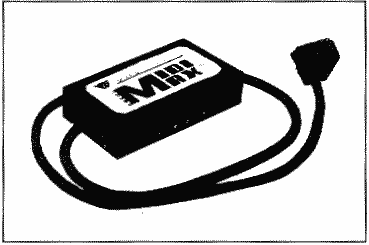
The MidiMax kit contains an interface that plugs into the SIO port and gives you the typical MIDI IN and OUT ports. The interface is beautifully made. There's an additional SIO port on it so the unit isn't dead-ended. The case is steel with a rugged wrinkle finish and is riveted together.
Whenever AC-powered music equipment is connected, you always have a slight chance of a high voltage appearing where it shouldn't. A potential (pun intended) exists for one unit to fry another. So the makers of MIDI keyboards and other devices include optoisolators in their instruments to prevent catastrophes. The MidiMax interface contains the same optoislators used in more expensive keyboards. The kit also contains two MIDI cables and a simple sequencer program called Midi Music System (MMS) written by Lee Actor (of AMS fame) under the Synthetic Software label.
Hooking the interface up is easy. You plug the SIO cable into your daisy chain, then connect MIDI IN on the interface with MIDI OUT on your keyboard using one MIDI cable supplied. The second MIDI cable connects MIDI OUT on the interface with MIDI IN on the keyboard.
Quest For MIDIMAX Software
The MMS software worked just fine for what it was designed to do, but I found it frustrating. When I asked Steve some weeks later if his kits were still available, he told me the interfaces were still available but the software wasn't, unless he suddenly got a very large demand for it. I couldn't, in good conscience, review the product under those conditions. He did tell me that there might be some pieces of MIDI software for the 8-bit still floating around that had been released by Hybrid Arts under the name of MidiTrack I, II, and III. They'd work with the MidiMax interface, but they were different from MMS in several respects (I'll get to that later). How could I get MidiTrack? Steve didn't know at the time.
A few weeks passed. I attended the Connecticut AtariFest and ran across Steve Cohen again-and pressed him once more for any leads on MidiTrack software. This time I was in luck. Hybrid Arts had closed up shop and transferred rights and inventory to a company called Barefoot Software. Barefoot had a booth at the Connecticut AtariFest, right next to the LIAUG table. Unfortunately, they had none of the software, but had sold it all to B&C ComputerVisions. I had no idea of the time frame. I couldn't recall seeing that software listed in a B&C ad in recent months. My software quest seemed futile, so I went to work with MMS just to satisfy my curiosity.
MIDI Music System
MMS turned out to be a "step-time" program. You enter notes from your MIDI keyboard or computer keyboard, and they get stored in a buffer. You then press RETURN to get each note listed in a "track." The time value of each note (quarter note, half note, etc.) has to be changed manually each time the music calls for a change-tedious! The tracks, moreover, are monophonic: they can't include chords. It's a fine system for beginners and those who wish to do a minimum of work but want their keyboards to play from their 8-bits.
MMS also comes with a conversion program, written by Jim Thompsen, that converts AMS songs to MMS. That can keep many of us who aren't musicians busy for quite a while. After you read in the AMS file and the conversion program writes out the MUS file, you load the .MUS file into MMS, choose some instruments, sprinkle in a few other MIDI commands according to the capabilities of your system, and your keyboard will serenade you for as long as you like. I demonstrated it for my other user group, the Ol' Hackers (OHAUG) and they were duly impressed. Alas, this software just isn't available anymore, unless, as Steve Cohen said, there's a big demand.
Enter Atari Classics
Atari Classics provided the key that made writing this review possible. In the June '93 issue, right on there on page 15, was the B&C ComputerVisions ad: in that ad was a listing for Miditrack II and III, complete with interfaces. I had the interface already and didn't need another one. I called B&C and asked if it was possible to get just the Miditrack III software. The people at B&C had just received the shipment and had to open the carton to see if it contained any loose software. I was in luck: they had some pieces consisting of just the software and manual. I ordered one, and I've been having all kinds of fun with it ever since!
Introducing Miditrack III
Miditrack III was written especially for the 130XE computer. Miditrack II runs on unmodified 800's and 800XL's and is probably less elaborate. I know from the Miditrack III manual that Miditrack III will import Miditrack II songs, but not the other way around. The file formats are different, and Miditrack III allows storage of longer compositions than Miditrack II.
For some reason, Miditrack III won't work properly if I have a cassette drive in the daisy chain: the keyboard locks up. I don't think that will affect too many people, since cassette storage is all but dead in this country. I just disconnected the cassette and had no more problems. Possibly the conflict is the result of my having added CSS's US+ operating system to my 130XE, but I can't be sure.
Another word of warning is to read the manual before you use this product. This program is loaded with features, but the keystrokes to get to them are complex. The manual does provide a command summary in Appendix B.
It's time to take some of you to school. You're all no doubt familiar with mechanical music. Is there anyone who hasn't had some experience with a Jack-In-The-Box toy? You know, you turn the crank, music plays, and at a predetermined time, the lid springs open and a clown head pops out. The music always plays in the same order (or the reverse order if you turn the crank backwards.) You can slow it down or speed it up, or stop in the middle, but the order and pitch of the notes and the time "Jack" pops up in relation to the music is always the same. The whole thing is digital: either on or off. A pin on a barrel hits a steel reed or it doesn't. It's a primitive example of a sequencer.
Under the MIDI standard, everything is also digital, only it's electronic. Clock pulses get sent 24 times each quarter-note to keep everything synchronized. Messages consisting of bytes tell the instruments in the hookup what note to play or not play, how long, how loud, with which voice. The messages come down the line serially at 31.25 Kbaud. The sequencer, which can be built into a keyboard, stand-alone hardware, or a computer program, puts those messages into order and transmits (playback) or receives (record) them in order. The user can also manipulate those messages, or MIDI events, add to them, edit them, combine them, etc., depending on the complexity of the sequencer. MidiTrack III permits you to do these things with your Classic Atari and has many advantages over MMS for more accomplished musicians. I'm going to try to whiz through this, so I'll ask you nonMIDI folks to please bear with me as I give you a lightspeed tour of the software.
Using Miditrack
Recording is usually a real-time affair, but step-time is also available. Sixteen tracks are available, and any track can be assigned to any of sixteen MIDI channels. Each track can be individually titled, as can the song name. Tracks can be soloed or muted. Track-mute presets are available. Tracks can be write-protected in RAM. They can be deleted, moved, copied, jumped and looped. They can be quantized, combined, and uncombined. Overall velocity and relative velocity changes can be set for each track, as well as overall note duration. It's easy to locate and eliminate hung notes.
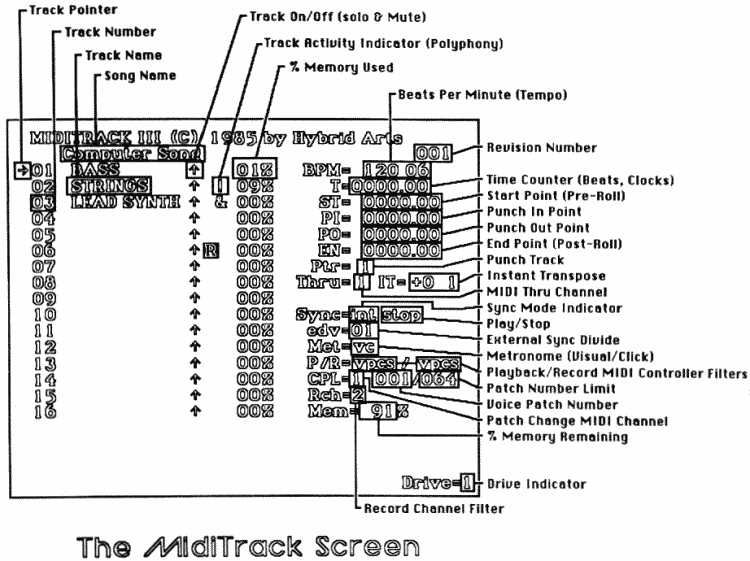
Tempos are adjustable from 2 to 750 BPM, and preset tempos can be stored in three registers. Step values are adjustable between 1 and 96. A time counter and start point for playback or cue are always on the screen (see the MidiTrack screen on page 30).
A song position pointer can be enabled. Start search makes it possible to send MIDI clock signals before start point so that sync can be locked. Sync, by the way, can be selected as internal, external, single step, MIDI or as TTL pulses through a joystick cable for non-MIDI drum machines. Punch-in and punch-out points can be set. Instant transposition is available, as well as a MIDI-Thru channel. A metronome is available with audible or visual clicks, or both. Playback and recording can include (or not include as the operator wishes) voice patch changes, pitchbend, MIDI controllers, and Start/Stop/Continue commands. Aftertouch is recorded separately. Voice patch selection includes choice of channel on which the information will be sent, the voice number itself, and the upper patch number limit. Memory usage for each track and total is reported in percent.
Test tones can be sent over one or all MIDI channels. The full range of MIDI modes can be selected for each channel. For those MIDI devices that will respond to them, an All Notes Off command can be sent, a Notes Off can be sent for all notes currently sounding, pitch-bend and modulation wheels can be zeroed, and Local On and Local Off can be sent. Although notes aren't normally displayed on the screen, polyphony is, and the last note played can be displayed at the expense of audible playback on command.
A full range of disk operations is possible, and the program itself can be copied with a special command. You are encouraged to make back-up copies; up to four drives are supported. Unfortunately, an entire disk side is reserved for each song recorded. I've only skimmed the surface of MidiTrack's features; a single review really can't do justice to the power of this software.
Limitations Of 8-Bit MIDI
Probably the most serious disadvantage of MidiTrack III is its 40-column display. You can't view the main screen and the note display simultaneously, and when the note display screen is on, audible playback ceases. Also, many of the display items and the keystrokes to get them aren't intuitive. It takes a lot of time just to learn those keystrokes. Are the results worth the effort? I think so.
There's another whole set of problems introduced by the music keyboard you use. Mine doesn't respond to half the commands the program contains. I could remedy that situation by buying a better keyboard ($$$!). My keyboard has two banks of voices with 110 voices in each bank. I can't select banks from the Miditrack III software: that requires a system-exclusive message that Miditrack III won't send. Then again, neither will MMS. They were both written before there was much use of such messages. I have a simple composition program for my IBM clone that does send that message, but won't do half the things that MMS or MidiTrack III will do. So, either my compositions are limited to one bank, or I switch banks manually from my keyboard.
Both MMS and MidiTrack III also suffer from another disadvantage. They were both written before MIDI files were standardized, so their files can only be used on an Atari 8-bit running either of those programs. In fact, MidiTrack III song files, because they're so long, require another program to convert them for easy transfer on telecom systems. I believe that program might exist in the GEnie or CIS libraries but haven't looked into it.
The Bottom Line
The MidiTrack II (800/800XL/65XE) and MidiTrack III (130XE or RAM-upgraded XL) programs are available for $79.95 with interfaces from B&C Computervisions, 2370 Scott Boulevard, Santa Clara CA, USA; phone 408-9869960 (see the B&C ad elsewhere in this issue). The Midi Music System software is no longer available, but you can order the MidiMax interface separately from Wizztronics at 31 Hewes Street, Port Jefferson NY 11777, USA; phone 631-473-2507. Using these products, 8-bitters with a musical inclination can take advantage of the capabilities available to them through MIDI. You might want to try this first before you run out and buy a Falcon!
