
Glenn M. Kleiman
Playful
Exercises
For The Mind
For The Mind
One premise underlies all I have to say in this month's column: the mind, like the body, is strengthened by exercise. I believe any activity is worthwhile if it leads people to exercise their creativity, thinking, problem-solving, memory, perception, concentration, math, or language skills.
Many toys, games, and puzzles provide opportunities for mental exercise. For example, building toys, such as blocks, Erector Sets, Tinker Toys, and Legos, provide opportunities for children to design, build, test, and modify various objects. Clay, crayons, and paint sets provide other means for creative play.
Also, crossword puzzles, and word games such as Scrabble, exercise vocabulary and spelling skills. Jigsaw puzzles exercise perceptual and imagery skills, while puzzles such as Rubik's Cube exercise problem-solving skills. Games such as chess and checkers involve problem-solving and planning skills. Many board games provide varied learning experiences. Monopoly, for example, simulates aspects of a real estate market in which players experience negotiating, buying, and selling. The game involves rents, taxes, utility bills, and banking. It also requires a fair amount of reading and math, particularly for the "banker."
Computers can be programmed to provide many types of playful exercise for the mind. In some cases, the exercises are similar to those which can be done without a computer, but the computer makes some things easier. Computers can be programmed to set up game boards on the screen, keep score, monitor time limits, save the "state" of games so they can be continued later, and make sure the rules are followed. But computers should not be limited to these mundane chores.
Making Real Use Of Computer Power
The flexible and interactive nature of personal computers, combined with their graphics, animation and sound capabilities, offers exciting new possibilities for mental exercises. For example, computers can be programmed to automatically adjust the level of challenge to be suitable for each player. Depending upon the nature of the game, the computer can adjust the speed of movement, the complexity of the materials, the size of the board, or the level at which it plays.
Computers can also provide hints, second chances, and other on-line aids. The graphics and animation make it possible to represent many things pictorially, as well as provide displays which hold players' interest. The sound and, on some systems, speech capabilities, also add to the attention-holding and information exchange possibilities. The continuous control players can have, and the speed at which the computer can respond, are additional important advantages.
Various types of mental exercise programs have been developed to take advantage of computer features. There are computer versions of paint sets, chess, checkers, Othello, crossword puzzles, Rubik's Cube, Scrabble, Concentration, and many more. Simulations provide another type of playful mental exercise. Adventure games and other interactive stories - stories in which readers direct and contribute to the flow of events as they read - also belong in this category.
I have reviewed some paint set and simulation programs in previous columns (October and November 1982), and I will discuss interactive stories, computer word games, and other types of playful exercises in the future. For the rest of this column, I will describe one program which is perhaps the best example now available of how computers offer new opportunities for play and creativity.
Pinball Construction Set
Suppose you were designing and creating a pinball game. You would have to figure out the shape of the playing area and barricades, where to put flippers, bumpers, spinners, lanes, gates, targets, and the other apparatus of these games. You would have to assign point values for when the ball hits each one, and add the essential sound effects.
Of course, good pinball games are not random arrangements. They are designed so there is a good amount of bounce, ample opportunity to use the flippers, and an appropriate amount of risk of losing the ball. There should be no places where a ball can get stuck or be caught in an endlessly repetitive pattern of bounces. The number of points scored in various ways should reflect the difficulty and likelihood of striking the various targets. Hitting all of a set of targets should yield bonus points.
And, of course, the overall design should be visually balanced and pleasing. Building such a game would require a great deal of thinking and experimenting. Certainly, a pinball construction kit would offer opportunities for creative, exploratory play comparable to those provided by other building toys.
Pinball Construction Set program, created by Bill Budge, offers all of the above possibilities and more. Once you have created a game, you can play it like any of the available video pinball games. You control the ball with the joystick. The play action feels like a real pinball game, and the movement of the ball is an excellent simulation of the real thing.
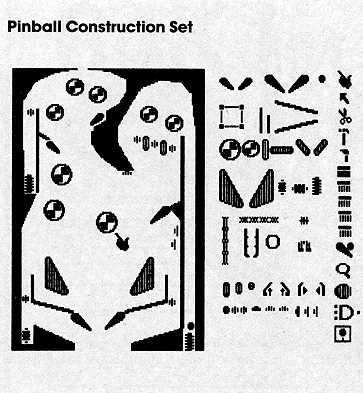
When you boot Pinball Construction Set, you see the screen with three types of elements. At the left is a box in the basic shape of a pinball game. At the right are pictorial representations (called icons) of the tools you have available - a hand, arrow, scissors, hammer, paintbrush, and others. In between are the pieces for the pinball game - flippers, bumpers, and all the rest. You construct your game, test playing it as you go. When finished, you can make a separate disk with your game, so that anyone can play it. The figure shows the screen after a game has been constructed.
You begin constructing a game by using a joystick to control the hand icon on the screen. You can move the hand to any pinball piece, press the joystick button to pick up the piece, and then move it anywhere on the game board. In the figure, the hand is shown in the middle of the board, having just placed the round bumper that is next to it.
There are a variety of pinball components available: two sizes of flippers; polygons which the ball just bounces off; bumpers which kick the ball away when they are hit; launchers which are like the spring-operated device that puts the ball into play; a ball hopper which captures balls until it holds three and then releases them all; a ball eater which makes the ball vanish; spinners; lanes; gates; rollovers; and targets - everything you need for a real pinball game.
Each time you pick up a piece, it is replaced with an identical one, so you can, if you choose, create a game with 30 pairs of flippers and 50 bumpers. The only limit is that a maximum of 128 pieces can be placed on the board. It's very unlikely you would ever want more.
Beyond Pinball
What I have described so far would make a very impressive pinball construction program, but Bill Budge has provided much more. You can change the shape of the board, and the shapes and sizes of the barricades. To do so, you simply move to the arrow tool and press the button to select it. When you select the arrow tool, knobs appear at the corners of each shape. Using the joystick, you can move the arrow tool to a knob and pull that corner out or push it in. The scissors and hammer are for removing and adding knobs so you can, for example, change a rectangle to a triangle or to a pentagon.
Another tool is the paintbrush. Pick it up, move it to the paint pot with your choice of color, and paint the board or any barricade. There is even a magnifying glass tool for very detailed painting.
Each pinball piece has an associated number of points and a sound that plays when the ball hits it. You can reset these. You can also use AND gates to link parts together for bonus points. That is, you can create effects such as: "If you hit all three of these targets, you get 10,000 bonus points."
Now for the most amazing part, which could be done only with computer pinball. You control the physics of the world in which the game is played! You can set gravity anywhere along a scale from very high to very low. Set gravity to be low, and the ball moves as if it's very light, almost like a Ping-Pong ball. Set gravity to be high, and the ball moves as if it's made of lead - it will even be difficult to shoot it into play with the launcher.
You can also change how much the ball bounces and how much the bumpers kick. You can play with a lively ball and dead bumpers, a dead ball and lively bumpers, or anything in between. By experimenting with these two controls, you get a good sense of how different factors interact in a physical system.
Finally, you can set the speed. This lets you put the whole game into slow motion. The ball moves the same distance as it would otherwise, but it goes very slowly. Or you can set the game to high speed and really test your reflexes.
Pinball Construction Set is remarkably simple to use. Everything is done with the joystick, and almost everything you need to know is represented pictorially. In fact, although it runs on much less expensive machines, the program has aspects of the Lisa and other new, more powerful machines.
With its encouragement of creativity, its visual appeal, its ease of use, the complete control it provides over the world of a pinball game, its inherent physics lessons, and its great fun, Pinball Construction Set is a truly remarkable program. If I had to select one program to demonstrate the potential of personal computers to provide playful exercises for the mind, Pinball Construction Set would be the one.
I have reviewed the Apple II version of this program, and, by the time this column appears, versions for Atari, Commodore 64, and IBM PC computers will be available. The Apple II version is available from BudgeCo, 428 Pala Ave., Piedmont, CA 94611. All the versions will be available from Electronic Arts, 2755 Campus Drive, San Mateo, CA 94403.